Number 7 in Widget-A-Day is a YouTube widget.
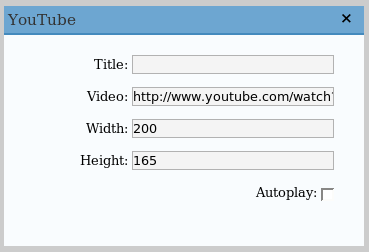
It’ll display a YouTube video in the sidebar. Just enter the URL of the video, and it’ll show in the sidebar. You can change the width and height, and make it autoplay or not.
SVN Checkout
svn co http://svn.wp-plugins.org/youtube-widget/trunk
Default display:

Admin panel:
Requirements
- WordPress 2.2 or 2.0.x/2.1.x with WordPress Widgets
Installation
- Download youtube.zip
- Extract and upload youtube.php to the plugins/ directory
- Enable YouTube Widget in the Plugin admin panel
- In widget admin panel, place YouTube in the sidebar, and edit it to enter the YouTube URL, not the embed code
Is there a way to use multiple instances of this? Or is there another plugin with that functionality?
This question was asked above but I wasn’t clear on the answer. thanks for this.
The removing of the YouTube URL is quite dumb. It should be a reg-ex, but I got lazy. If anything is slightly different with the URL, even case wise, it won’t work right.
thanks. this is a nice plugin. do you know if you will be adding any extras. will the plugin be developed. a future which would automatically update you tube videos would be useful. thanks
wow, dude.Thanks for the great plugin.:DD
Does your widget work on WordPress 2.7?
It should.
No, Man its not working
HI, thanks for the plugin, I have a problem with it as it show me this error:
Warning: array_slice() expects parameter 1 to be array, null given
were all the errors in the php have this:
$items = array_slice($feed->items, 0, $maxitems);
foreach ($items as $item)
any help?
Running WP 2.6.5
@Mark, what? array_slice and $feed are never used in this plugin.
James, My apologies, wrong plugin…glad to find out!
I saw this question before but didn’t see an answer. Is there any way to get this widget to go up on a sidebar more than once?
Great widget!
It seems your plugin has just stopped working on every site I had it on. Once example, http://www.vmsphotography.com when you goto the pages, there is suppose to be a youtube video that is in the top left corner.
I would like to use this plugin as want display only on certain pages? some sort of if{condition} any help or guide pls?
Thanks
Thanx for this useful plugin!
It gives me the following error:
Fatal error: Call to undefined function: str_ireplace() in /var/www/vhost/mas-memory.com/home/html/somos/wp-content/plugins/youtube.php on line 111
How can I fix this?
Thanks
I know this isn’t a great fix, but for multiple instances of this plugin, I just copied the plugin file, went through the whole code and replaced every “youtube” into “youtube2” in all the code and everything. I then uploaded the copy in to the plugins folder and activated my new “Youtube2” plugin. Not a great fix, but I only needed two instances of it anyway.
Nish: try Widget Logic for your condition request. It’ll add a widget logic field on the bottom of all plugins. You just need to know the page/post id # and then type in ‘is_page(id_number_here)’ without the quotes. You can find the plugin here: http://wordpress.org/extend/plugins/widget-logic/
Doesn’t work.
Hi James,
Just downloaded and uploaded this Plugin.
It’s activated in the PLugins section.
Under the Widgets section it appears but it wont let me ‘add’ it to the sidebar as the ‘Save’ button disappears and therefore wont allow me to save or activate it.
I’ve tried doing it a few times but cant get it to work.
I have WordPress version 2.7.1 on the site that I have currently installed this plugin.
What should I try??
Hi James,
I downloaded your You Tube plugin, but Í’ve got problems using it. I’m using the fusion theme. At the widgets page the YouTube widget is shown. If I click on ‘add’, the ‘current widgets’ disappear, and the “save chacges button” as well. Do you have any idea how to solve this problem?
Thanx in advance, Barbara
Hi,
Am trying to load your youtube widget to the site. Will it work with WP 2.7.1? If not, is there another youtube widget you could recommend.
Thanks
Thanks for this great widget. I have it working on my website.
Am running WP version 2.8. Cannot drag from available widget column to the sidebar. Any comments on what to do??? Thanks
I’m having the same issue. Cannot drag to the sidebar. Any help?
Sorry James…
I used this widget for a week before I realized that I could accomplish the same exact thing by using a regular text widget and putting the embed code from youtube into it. It was much easier to use, I can have multiple instances and I know that it will always be compatible.
Thx for the widget, anyway, is it valid xhtml?
Ben,
Care to share your code so James and the rest of us can see how to do this?
Andy.
I see others w/ same problem – your widget will not drag to sidebar.
pasting you tube code to text widget doesn’t work either. I’m missing sometuning here
paste code to text widget and all sidebars disappear.
I find that the kiss of death when you geeks tell me how easy it is.
The more you use the word ‘easy’ the more trouble I’m in.
Do you have a more specific-extended list of instructions to install
for those of us who are not as smart as a fifth grader?
I installed this but I was getting ‘call to undefined function str_ireplace(). This function is only available in php5. So I went to plugin editor, and changed str_ireplace to str_replace and it worked (str_replace IS php4 compatible)
just a quick question, ive installed this plugin and used the widget in my sidebar, only thing bugging me is that the thumbnails and titles are left aligned…ive tried styling all the and elements of the widget in my css file and aliging them to center and auto margins etc but nothing seems to work…any suggestions?
Thanks a lot 🙂
Justin
it’s better to put it into code.
Hey James.
thanks for the plugin dude but can you tell me if i would be able to add multiple videos?
Had the same problem as Andy (September 18, 2009 at 7:23 am) and the replacement of str_ireplace to str_replace worked perfectly.
Does your widget work on WordPress 2.7?
this is a nice plugin. do you know if you will be adding any extras. will the plugin be developed.
Plug-in not working displaying blank area..
not recommend…:(
looking for some other plug-in.
Hello james! I am having problem with sliding you tube wideget to the right.Can you assist me with this?What should i do?
hi james,
thanks for the widget. i just wanted to know how i can add to two extra
fiels after titel (company and comment). I am a total beginner in php
thanks for your help
andy
Thanks for the great widget! How do you get the plugin to appear on the sidebar more than once? When I move the YouTube widget to the side bar it disappears from the “available widgets” section.
Please HELP!
all the best,
Judy
The You tube widget worked perfectly for me. Thanks very much!
hi…. got the widget installed… can’t drag it to the sidebar tho…. any fix for this?
TIA
wendy
This widget is working great for me in mozilla but not in Internet Explorer. I get a red X in explorer. Also is there a way to have multiple widgets. I would like to use the widget it both my homepage sidebar and my page sidebar
I am creating a new website for an exsiting one and when I do the widget it shows the video twice, directly under each other.
This is great if it could be two different videos, but it’s the same video and on autoplay the 2nd delays start after 2-3 seconds after the 1st, which is annoying to hear, and not really how I want the site to look.
lovelydesigns.com/lovelyhairstudio
Hi i was wondering how could i fix the errors that
W3(http://validator.w3.org) is giving me about your widget please if you see this message contact me and let me know how to do it.
$widget = <<<YTB
YTB;