Number 5 in Widget-A-Day is a Weather widget.
It isn’t too fanciful. It displays the current condition, temperature, and the feels like temperature. It uses weather.com‘s xoap api to retrieve the information. I’ll probably come back to this and make it better.
SVN Checkout
svn co http://svn.wp-plugins.org/weather-widget/trunk
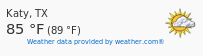
Default display:
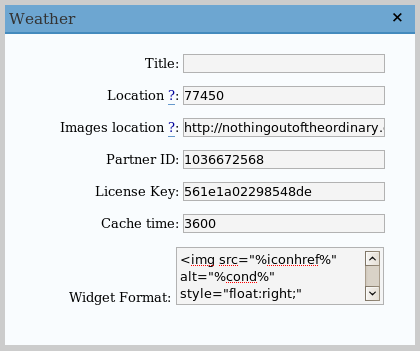
Admin panel:
Requirements
- WordPress 2.2 or 2.0.x/2.1.x with WordPress Widgets
- PHP 4.3.0 or greater (needed for function file_get_contents)
Installation
- Download weather.zip
- Extract and upload weather.php to the plugins/ directory
- Enable Weather Widget in the Plugin admin panel
- In widget admin panel, place Weather in the sidebar, and edit it to enter your location
Location
The location can either be a zip code for US users or the locid. To find the locid, you can do a search using http://xoap.weather.com/search/search?where=[search parameters].This will return an XML file with search results and their corresponding locid’s.
You can also find it out by the Weather.com website. After searching for and selecting you city, you will be sent to a url that will look something like, http://www.weather.com/outlook/driving/interstate/local/USTX0617?from=search_city, where USTX0617 is the locid.
Image Hosting
I’ve provided the images used and provided by weather.com here. If you want to host your own images, extract and upload the files, then, in the admin panel, edit the ‘Image Location’ field to point to your directory of images. Make sure to have the trailing slash.
If you don’t use your own images, you are free to use the ones that I’ve hosted, which are located at https://jamesdrakewilson.com/blog/weatherimages/
Editting display
You can edit ‘Widget Formatting’ to change how the info is displayed. To access the variables, use this formatting:
- %loc% – Location
- %temp% – Current temperature
- %feels% – Feels like temperature
- %icon% – The icon referring to the current weather. This is just a number
- %iconhref% – The location of the image with your set image location at the front
- %attribution% – The link supposedly required to be displayed. Weather data provided by weather.com®
The default formatting is:
<img src="%iconhref%" alt="%cond%" style="float:right;" />

%loc%<br />

<span style="font-size: 150%;">%temp% °F</span>

(%feels% °F)<br />

<span style="font-size: 65%; float: right;">%attribution%</a>
Hi James,
Any idea why my weather widget always shows the N/A icon?
Any advice appreciated!
Cheers,
Paul
Is there a way to list more than 1 location? I would like to show the weather for two different areas.
Thanks,
Fred
Hi I had to recently upgrade my server to PHP5 and upon doing so the weather widget stopped displaying data. I tried trouble shooting and I am sure I am over looking something. Any ideas?
Thanks! I am installing it right now. Can you change the appearnce of it at all?
Thanks!
Great plug in. Can you tell me what the Cache time means. I am using an updated copy of jamestownspeedway.com
hi, would like to see Celcius but it only comes up with Farenheit even with C selected. any idea? well, i use the latest WP version
Hi, thanks for widget…I am havig an issue with the plugin…It is displaying both values in same units…for example, weather here in Kampala Uganda is displayed as Kampala, UGANDA 20 °F (20 °F) and 68 °F (68 °F) instead of, supposedly, 20 °C (68 °F)…I have not changed any values….any ideas???
Hi,
I’m using your plugin on my site, but can it be that this service of weather.com has changed? when echo-ing $data, I don’t see ,, … it just isn’t xml! Do you have any idea how this ‘new’ xml can be parsed?
I’m also trying to figure out how to add an additional location. I tried adding two copies of the weather.php file in two different plugin folders but that didn’t work either…
I LOVE this widget, tis my fav out of them all, and I’ve went through dozens of dynamic weather sources and this is all I really wanted in the first place. Thank you for simplicity!
It shows always the wrond location. I’m looking for Aosta, Italy and the corresponding querystring is: Aosta+Italy+ITXX0103, but if I’ll insert this code inside the gadget, it will show Turin, Italy. Near to Aosta, but not it. I searched a more precise site, Valtournenche, Aosta, Italy, and the code result is 666007:11 but in the gadtget it corresponsd at Le Moleson, SWITZERLAND.
Any idea?
Thank you.
Guido (Italy).
Is there a way to include the widget in the header?
I tried using but it didn’t work.
Thanks.
Is there a way to include the widget in the header?
I tried using “php include” but it didn’t work.
Thanks.
Rather than using $data = file_get_contents($uri) on line 58, you can use the WordPress API.
$request = new WP_Http;
$result = $request->request( $uri );
$data = $result[‘body’];
This enables more flexibility for shared hosting users that do not have the ability to edit external file retrievals.
Hi
Great plugin. I am using WordPress v.2.8.4 and am having the same problem as skypanic, I can’t get the Celsius option to display. I have selected it in the Configuration panel but the display still shows Fahrenheit.
Cheers.
Hi
I have investigated my issue with the Celsius/Fahrenheit setting a bit more and have discovered that the temperature values were actually correct but the C/F always displayed as F. I manually changed the F to a C in the Widget Format area of the control panel (ensure you have sufficient rw file permissions or you will break the plugin).
Hey presto! The widget displays my temperatures in Celsius 🙂
Thanks for the great little plugin/widget. It works great on our site on the first try without any problems.
how can i call the function in a place of my choose?
i want tu puto not with a widget, i want tu put in my header.
thank you
Hi. Is there any way to auto retrieve visitor’s location to show him relevant weather forecast?
This didn’t work..at first. I had to change the file_get_contents to curl. Something like this:
[php]
$ch = curl_init (‘http://xoap.weather.com/weather/local/’ . $location . ‘?cc=*&link=xoap&unit=’ . $unit . ‘&par=’ . $partnerid . ‘&key=’ . $licensekey;);
curl_setopt($ch, CURLOPT_HEADER, 0);
curl_setopt($ch, CURLOPT_RETURNTRANSFER, 1);
curl_setopt($ch, CURLOPT_BINARYTRANSFER,1);
$data=curl_exec ($ch);
curl_close ($ch);
[/php]
Make sure you comment out the $uri and the $data=file_get_contents stuff . i.e. add two ‘/’ like this – // in the weather.php file
You don’t necessarily need to grab the data from weather.com…you can also use noaa.gov and their xml feeds.
hi, would like to post two differnt weather locations.
is this possible with your widget?
thanks!
chris
Which are variables for the following options:
Today temperature (high / low), tomorrow, day after tomorrow? I would like to ad this below current weather!
looking for a weather widget, noticed your folder hosting the images for the widget has been hacked:
https://jamesdrakewilson.com/blog/weatherimages/
Thanks for the weather widget. I was trying it out on my site. How do I change the temperature from fahrenheit to Centigrade?
ciao Ang
Is this one working with wordpress 3.0.1 ?
Weather.com has changed their API to one that requires a paying subscription. So, unless you want to pay them $20/month for to use this, I’m going to have to change to a different provider. I’ll try to do this as quickly as I can, hopefully in a few days or by this weekend.
Hi James,
How are you?, I have been using the plugin for a while succesfuly, and now is not working any more as you explained.
The question is, Do you have plans to fix it using another service?, if not I’ll try to find a replacement.
Thank you very much in advance,
Diego.
When you find a different provider, will it be necessary to uninstall and reinstall the widget, or will the change be transparent to users?
Hi,
Are you any closer to getting another weather provider? I really like your widget and would like to have it up and running again?
Hello James, any news about new API provider / new version of plugin?
Hi, James — Any update on getting a new source for the weather info?