Number 5 in Widget-A-Day is a Weather widget.
It isn’t too fanciful. It displays the current condition, temperature, and the feels like temperature. It uses weather.com‘s xoap api to retrieve the information. I’ll probably come back to this and make it better.
SVN Checkout
svn co http://svn.wp-plugins.org/weather-widget/trunk
Default display:

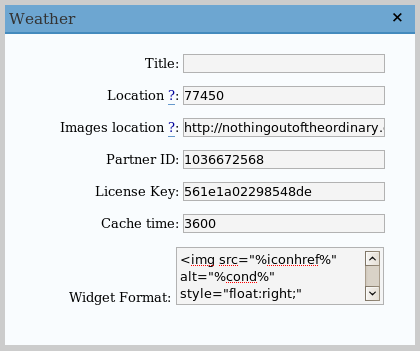
Admin panel:
Requirements
- WordPress 2.2 or 2.0.x/2.1.x with WordPress Widgets
- PHP 4.3.0 or greater (needed for function file_get_contents)
Installation
- Download weather.zip
- Extract and upload weather.php to the plugins/ directory
- Enable Weather Widget in the Plugin admin panel
- In widget admin panel, place Weather in the sidebar, and edit it to enter your location
Location
The location can either be a zip code for US users or the locid. To find the locid, you can do a search using http://xoap.weather.com/search/search?where=[search parameters].This will return an XML file with search results and their corresponding locid’s.
You can also find it out by the Weather.com website. After searching for and selecting you city, you will be sent to a url that will look something like, http://www.weather.com/outlook/driving/interstate/local/USTX0617?from=search_city, where USTX0617 is the locid.
Image Hosting
I’ve provided the images used and provided by weather.com here. If you want to host your own images, extract and upload the files, then, in the admin panel, edit the ‘Image Location’ field to point to your directory of images. Make sure to have the trailing slash.
If you don’t use your own images, you are free to use the ones that I’ve hosted, which are located at https://jamesdrakewilson.com/blog/weatherimages/
Editting display
You can edit ‘Widget Formatting’ to change how the info is displayed. To access the variables, use this formatting:
- %loc% – Location
- %temp% – Current temperature
- %feels% – Feels like temperature
- %icon% – The icon referring to the current weather. This is just a number
- %iconhref% – The location of the image with your set image location at the front
- %attribution% – The link supposedly required to be displayed. Weather data provided by weather.com®
The default formatting is:
<img src="%iconhref%" alt="%cond%" style="float:right;" />

%loc%<br />

<span style="font-size: 150%;">%temp% °F</span>

(%feels% °F)<br />

<span style="font-size: 65%; float: right;">%attribution%</a>
I assume that changing the “F” in the ‘Widget Format’ to a ‘C’ would display the weather in Celsius, but modifying this and saving didn’t change the display. Is my assumption wrong?
Yeah, that doesn’t change it. But I just hacked together a version that will allow you to change between Fahrenheit and Celsius.
Updated version:
weather.zip (gz)
You have to select Celsius from the drop-down box, and change the ‘F’ to ‘C’ in Widget Formatting to make it look correct.
Great! All the customization works now. I wanted to replace the location title and that works now too. Thanks!
This is my first post
just saying HI
Just wondering if this works for WordPress MU as well. Just checking…
Any chance of inserting this as a function like ? I can use widgets but …
Didn’t test this at all, but it should work. If it doesn’t, tell me the error and I’ll fix it. It doesn’t cache anything, but you should be using something like wp-cache anyways.
Copy weather.php to plugins/ and enable, then in your theme file call weather(‘location’).
You can change the partner id, license key, and image location by subsequent arguments.
Download weather-function.zip
Hey,
I downloaded weather-function.zip. Does this allow me to put the code somewhere other than the sidebar? I have a list of locations across the US (a standard PHP, non-Wordpress page) and would like to show the weather for each location, if possible.
Thanks ..
Yes, but redownload it. I don’t know what I was doing when I first made it, but I just screwed it up completely. I just went through it and fixed it.
For a non-wordpress page, just include weather.php, then call the weather function.
I just did:
Hey.. question on your weather widget. Works great, but it’s the only widget that doesn’t have any space below it. If I put another widget right below it, it will literally sit right on top of the next text title. How can I add a little space to the bottom of the widget? Thx!
In the widget formatting section, try adding a <br /> to the end.
I tried to get this to work for my blog in Iraq, but when I enable the widget I basically blank out my sidebar. I’m sure this is user error, but I’m not sure where to start. I put in the location (IZXX0008) and used your hosted icons, and made no other changes. Do I need to fill in the other boxes (license, etc.)?
Thanks!
Yes, partner id and license key need to be filled in. It should be done automatically, but it seems sometimes that doesn’t work.
You can use these:
Partner ID: 1036672568
License Key: 561e1a02298548de
Hi,
I have installed the weather widget, but it doesn’t really work. I don’t know what I am doing wrong.
You can see it with 0 temp under the categories widget at http://www.shimshon9.com.
Thanks!
Os there a way to show not only the current weather, but, as example, 4 days forecast?
It would be great to have various days in the plugin!
Thanks!
CONDORES DE LA RUTA – MC
I just add this comment to be notifyed … Thanks for the WP plugin!
This is a really great plugin.
I’m hoping to use it in a modified environment, instead of in the sidebar as an on-page element. Can you add support for template function calls like other plugins support?
This would make this plugin even more versatile! Please let me know, thanks! 🙂
I just came back to this after upgrading WordPress to 2.5, and now I can’t get to the admin panel. Either a bug or a boneheaded user error. Both equally possible, I suppose. 😉
All of a sudden my weather values are not being shown, do you have any clue as to why this is happening?
I haven’t changed anything lately, i tried upgrading to the newer version of wordpress but this resulted in no change.
I have using this widget for some time now, but it has stopped working now. All I can see is “°C ( °C)”.
Do you know how we can fix this
I’m having the same issue. It stopped working sometime in the last few weeks. Anyone know why?
Egads, wish I’d read to the bottom before installing! Like the concept, would be good to know if it’s going to be fixed or not.
Still doesn’t work… 🙁 WP 2.5.1
Recently i installed this great plugin for a travel blog of my client and it works without error in WordPress version 2.6
Thanx much for the plugin/widget.
I have a non-wordpress theme and I can’t get it to work.
I tried to include the php file like in the post earlier but just get an error. Any ideas?
Hi and thanks for this awesome widget/plugin.
All works fine, though changing to Celsius didn’t work until i changed the “F” to “C” through the widget admin.
There’s one more thing i’d like to know/see…
All other widgets show a CSS dotted bottom border… your’s doesn’t? How can i make your widget have that same bottom border too? it kinda unifies the whole sidebar when everyhting looks the same…
Thanks,
Roy
Nice plugin…great for blogs about certain cities or locations. I am going to suggest this to my readers! Thanks!
How do I style this widget? I need to change background, top and bottom to match my blog. Thanks!
Sorry, nevermind, I found it. Great plugin, thanks!
Weather Function don’t work. I don’t know why. I download and install plugin. I call weather(‘location’) but don’t work. Don’t show anything. Please help.
Umm, it doesn’t have a weather() function. It’s a widget and that’s it.
I talk about Weather Function weather-function.zip for non-widget plugin. I can’t run it.
It takes away my resent posts links in the WP 2.7 right hand side and i was wanting something that could take 6-8 locations across the top section of the home page or a page where people first see when going to my blog for the Capital Cities in Australia. But it looks good.
It would be great to be able to use this to show the weather in multiple cities. Is there anyway we could get that to work?
The widget currently has an affect of re-styling whatever Contents are below the Weather widget, eg. Blogroll,Pages, Categories, etc.
http://img204.imageshack.us/img204/1005/weatherwidgetaboveotherjv2.jpg
When the Widget is moved below other widgets, it will have no affect on widgets above.
http://img516.imageshack.us/img516/2946/weatherwidgetbelowotherqo6.jpg
WordPress: 2.7
Themes: Journalist (http://lucianmarin.com/)
@Gareth, the last span isn’t closed. Add </span> to the end of your formatting section.
James, any chance that the weather function is stil available for download? http://nothingoutoftheordinary.com/wp-content/uploads/2008/01/weather-function.zip is not working
@blestab, my bad. I did the redirects slightly wrong. That link should work now.
New link would be:
https://jamesdrakewilson.com/blog/wp-content/uploads/2008/01/weather-function.zip
thanks a lot, got it. ill try it out just now and let you know if i succeed with it.
ok done, this is all i’m getting in my page:
°F ( °F)
Weather data provided by weather.com®
i created a file “pretoria.php” with the following code in it
the file weather.php is in the same location as pretoria.php, when i access http://localhost/wf/pretoria.php im just getting the display above. am i doing something wrong? please help
oops! code in my pretoria.php is:
Weather.com changed their API slightly. I think I made the plugin before the change and never changed it. That’s probably the problem.
Updated it, haven’t tested it.
https://jamesdrakewilson.com/blog/wp-content/uploads/weather-function-updated.zip
@james, you are a star man. keep shining! 🙂
I just tried installing this widget. After activating the plugin and returning to Widgets under Appearance, all the widgets I’ve already installed don’t show on the right of the page and neither does the [save changes] button, so even if I click [add] to add the weather widget, I can’t then save the changes.
I have WP ver 2.7.1 installed.
Curious if there is any way to display BOTH Celcius and Farenheit at ths same time ?
Not currently. The weather api only returns one or the other. You could convert it I guess though.